ERC vs DRC in PCB Design: What Each Check Catches and What It Misses
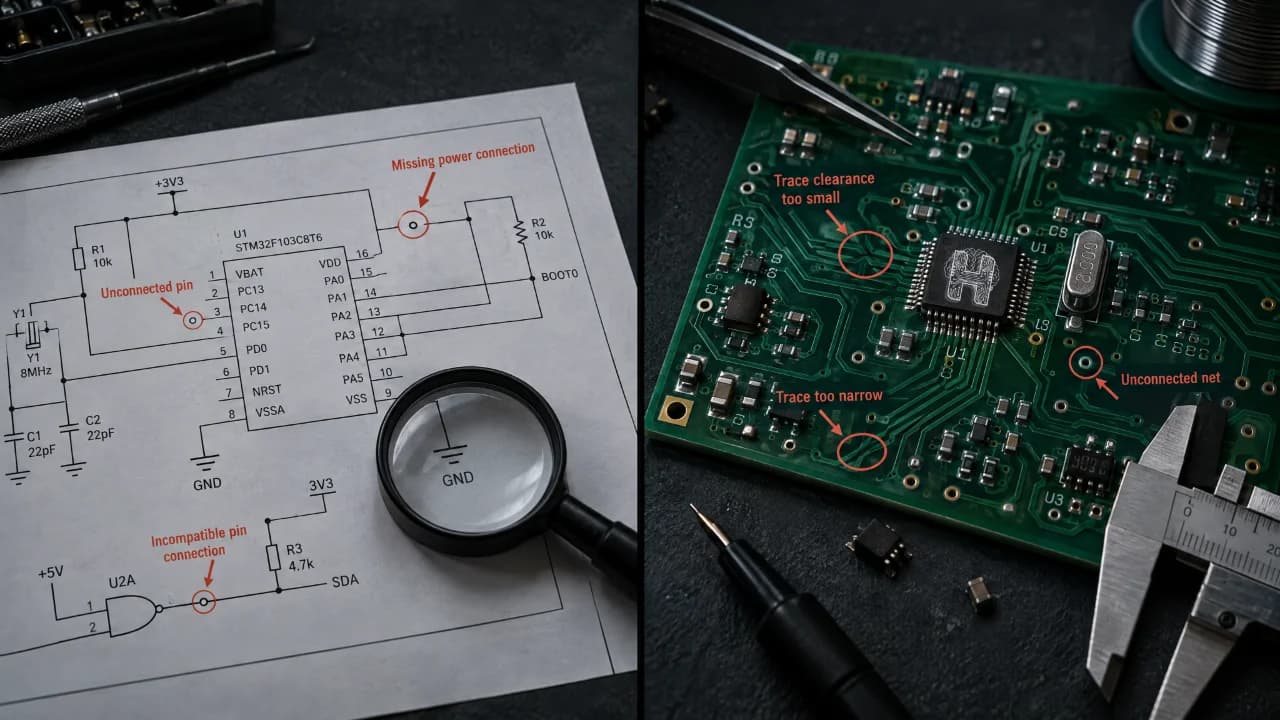
Designing a reliable printed circuit board (PCB) requires more than connecting components and routing tracks. Small mistakes in circuit schematics or PCB layouts can lead to electrical problems, manufacturing defects, and costly redesigns. This is why understanding ERC vs DRC in PCB design is essential for engineers, students, and electronics enthusiasts.
Electrical Rule Check (ERC) and Design Rule Check (DRC) help identify potential problems before a PCB reaches manufacturing. Although both support PCB design verification, they focus on different aspects of the design. Knowing what each check catches, what it misses, and when to use it can help improve design quality.
What Is the Difference Between ERC and DRC?
The main difference between ERC and DRC lies in what they validate. Electrical Rule Check (ERC) examines electrical connections and pin relationships in a schematic, whereas Design Rule Check (DRC) evaluates the physical PCB layout against configured design constraints. ERC helps identify potential problems before the schematic moves further into the design process. For example, it may flag incompatible pin connections or power-related issues. DRC, on the other hand, helps detect layout problems such as insufficient copper clearance, incorrect trace widths, and unconnected tracks. Both checks are important because a schematic can appear electrically consistent while its PCB layout violates manufacturing rules.
What Does ERC Check in PCB Design?
Electrical Rule Check (ERC) supports PCB schematic validation by examining connections between components and checking them against the electrical rules defined by the design software. Depending on the tool and its configuration, ERC can identify unconnected pins, incompatible electrical pin relationships, missing power connections, and certain floating connections. It can also flag situations where a power input pin is not driven by a recognized power source. For example, if a circuit contains a component whose power pin is not connected as expected, ERC may generate a warning. This gives the designer an opportunity to review the schematic before proceeding. However, ERC cannot identify every possible circuit problem. An incorrect resistor value, unsuitable component selection, or logical design mistake may remain undetected if it does not violate the configured rules. To fix ERC errors in PCB design, review each warning, inspect the affected connections, verify component pin assignments, and correct genuine problems. Some unconnected pins may be intentional, so always check the circuit's intended behavior before making changes.
What Does DRC Check in PCB Design?
A PCB Design Rule Check evaluates the physical board against configured layout constraints and applicable manufacturing requirements. DRC is important during component placement, routing, and final PCB verification. DRC can identify clearance violations between copper features, tracks that are narrower than the specified minimum, incorrect via or drill dimensions, and unconnected nets in the PCB layout. Depending on the rules, it may also flag copper features positioned too close to board edges. For example, two copper tracks placed closer together than the permitted clearance may create a risk of short circuits during manufacturing. A PCB design rule check helps identify this issue so the designer can adjust the routing before fabrication. To fix DRC violations in PCB layout, inspect the reported locations and compare them with the project's design constraints and manufacturer's specifications. Adjust routing, trace widths, clearances, or component placement as needed, then rerun DRC to verify the corrections.
Why Does a PCB Need ERC and DRC?
A board needs both because they cover different risks. ERC protects design intent, and DRC protects manufacturability. Together they remove many common PCB design errors while fixes still take minutes, not weeks and a fresh batch of boards.
What ERC and DRC Cannot Detect?
Passing ERC and DRC does not automatically mean that a PCB is ready for reliable operation. Both checks depend on the rules, settings, and design information available to the software. ERC may miss functional errors, incorrect component values, or circuit behavior that appears valid under the configured electrical rules. DRC does not independently guarantee signal integrity, thermal performance, electromagnetic compatibility, or correct operation under real-world conditions. These limitations make additional validation important. Depending on the project, designers may need circuit simulation, engineering review, signal integrity analysis, thermal evaluation, and physical hardware testing.
When Should You Run ERC and DRC in PCB Design?
ERC and DRC are used at different stages of the PCB design workflow. Run ERC after creating the schematic and repeat it whenever significant electrical changes are made. Resolve genuine schematic issues before moving to PCB layout. During component placement and routing, run DRC regularly to identify layout violations early. Before manufacturing, rerun the relevant checks after the final design changes. Review all remaining warnings rather than assuming that every warning is harmless or that every reported issue must be corrected without investigation. The best way is to understand when to run ERC and DRC which helps in reducing avoidable design errors and makes the verification process more systematic.
How to Fix ERC Errors in PCB Design?
To fix ERC errors in PCB design, start with the earliest one, since a single mistake often triggers several others. Connect floating pins or mark deliberately unused ones with a no-connect flag. Add power flags to supply nets so power pins are recognized as driven. Separate any outputs that share a net, and renumber duplicate designators.
How to Fix DRC Violations in PCB Layout?
To fix DRC violations in PCB layout, first confirm your rules match your manufacturer’s stated capabilities. Then reroute congested traces, widen thin ones, increase spacing around close copper, enlarge via rings, and clear silkscreen away from pads. Rerun DRC after each round to confirm nothing new appeared.
How Helektron.ai Makes PCB Design More Accessible
Helektron.ai is a browser-based AI-powered circuit and PCB design platform that helps users develop electronic designs without installing traditional desktop software. Users can describe their circuit ideas and work toward turning them into practical designs through an accessible, AI-assisted workflow. For beginners, students, hobbyists, and professional engineers, this approach can make electronics design more approachable. Understanding ERC and DRC remains equally important because AI-assisted design and rule-based verification serve different purposes. When evaluating an AI PCB design tool, users should consider how it supports schematic creation, PCB layout, error identification, and design validation. Specific ERC and DRC capabilities should always be confirmed against the platform's available features. By combining a structured design workflow with appropriate verification, Helektron AI users can make more informed decisions as they develop circuit and PCB designs. For further details contact Team Helektron at +91 87965 06854 Read- BOM Cost Reduction: 6 Proven Ways to Cut Your PCB Bill of Materials Visit website- Helektron.ai