What Is PCB Prototyping? From Design to First Board
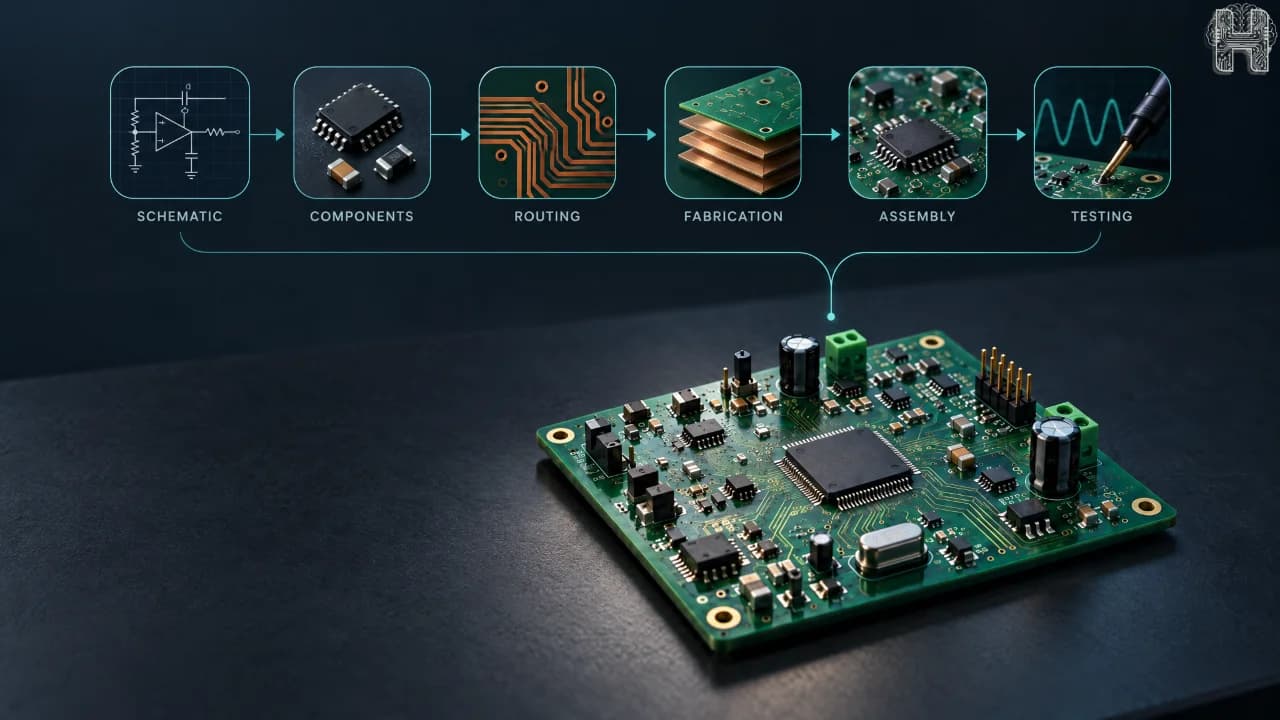
A PCB prototype is the first physical version of a printed circuit board created to test and validate a design before moving to larger-scale manufacturing. It connects digital PCB design with real-world hardware testing, helping engineers identify electrical, mechanical, manufacturing, and assembly issues early.
For anyone learning PCB prototyping for beginners, understanding the complete journey is important. A successful board does not start at fabrication. It begins with a circuit idea and moves through schematic design, component selection, PCB layout, verification, manufacturing, and testing.
What is PCB prototyping?
PCB prototyping is the process of creating one or more physical PCB boards from a digital design so the circuit can be tested and validated before production. A PCB prototype helps designers discover problems that may not be obvious in a schematic or simulation, such as incorrect footprints, routing issues, component placement problems, thermal concerns, or assembly challenges. Prototyping is therefore more than simply ordering a small number of boards. It is a practical validation stage between PCB design and prototyping and final manufacturing.
What are the steps of PCB prototyping?
The PCB prototyping process can be summarized as: PCB prototyping → PCB design → schematic → components → PCB layout → routing → DRC → BOM → Gerber files → fabrication → assembly → testing → validation → iteration → manufacturing The exact workflow can vary by project, but these stages provide a useful roadmap from an initial idea to a tested physical board. 1. Create the schematic The process starts with the circuit requirements. Designers create a schematic showing components and their electrical connections. This establishes how the circuit should function before its physical layout is created. 2. Select components The next step is choosing appropriate components, footprints, ratings, packages, and quantities. Component availability and manufacturability should also be considered because a theoretically correct design may still face problems during assembly. 3. Create the PCB layout The schematic is then transferred into the PCB layout. Components are positioned on the board, the board outline is defined, and electrical connections are converted into physical copper traces. 4. Route the board and run DRC Routing connects components while considering trace width, spacing, power paths, signal integrity, and other design requirements. A Design Rule Check (DRC) can identify violations before manufacturing. 5. Prepare the BOM and export files The BOM (Bill of Materials) lists the components required for assembly. export files and other manufacturing data communicate the board design to the fabrication process. Manufacturing packages can also include drill and assembly information depending on the project. 6. Fabricate and assemble the prototype The manufacturer produces the physical PCB according to the manufacturing files. Components can then be assembled onto the board using methods such as SMT or through-hole assembly. 7. Test, validate, and iterate The finished prototype is powered and tested against its requirements. Engineers may check electrical performance, functionality, mechanical fit, thermal behavior, and other project-specific requirements.
How does PCB prototyping work?
A digital PCB design is converted into manufacturing data, fabricated into a physical board, assembled with components, and tested against the original requirements. The important difference is that prototyping creates an opportunity to compare design expectations with real hardware performance. Simulation and design checks can identify many problems, but physical testing can reveal issues associated with assembly, mechanical fit, thermal behavior, manufacturing tolerances, and real-world operation.
How to prototype a PCB?
If you are wondering how to prototype a PCB, start with a clear circuit requirement and create a verified schematic before moving to PCB layout. Select suitable components, complete placement and routing, perform DRC and other relevant checks, prepare the BOM and manufacturing files, and then order the prototype for fabrication and assembly.
What is the difference between PCB design and PCB prototyping?
PCB design creates the digital representation of the circuit and physical board whereas, PCB prototyping takes that design into the physical world so it can be fabricated, assembled, tested, and validated. In simple terms: PCB design = creating the board digitally. PCB prototyping = building and testing the physical version. The two stages are closely connected because problems discovered during prototyping can lead to changes in the PCB design.
How long does PCB prototyping take?
There is no single timeline. It depends on board complexity, fabrication requirements, component availability, assembly method, manufacturer lead time, and the number of design iterations. Simple prototypes can move quickly, while complex multilayer or specialized boards may require considerably more time.
How much does PCB prototyping cost?
The cost depends on factors such as board size, layer count, materials, quantity, fabrication requirements, component costs, assembly, testing, and shipping. A prototype may cost more per board than a large production run because production benefits from economies of scale.
How Helektron.ai Helps with PCB Design
Helektron.ai brings AI into the PCB design workflow through a browser-based PCB design experience.As an online PCB design tool, Helektron.ai allows users to work toward circuit and PCB designs directly in the browser without traditional desktop installation. Its AI-focused workflow can help users describe what they want to build and move from a circuit idea toward a structured design. For beginners, engineers, students, and hobbyists, this approach can make AI PCB design, AI circuit design, and PCB development more accessible while keeping the focus on the complete journey from concept to physical prototype. The goal of PCB prototyping remains the same: build, test, learn, improve, and validate before manufacturing at scale. AI can help make the design stage more accessible and support faster design iteration, while physical prototyping remains an essential step for proving that the finished hardware works as intended. Also read - How Helektron Works: Complete Guide to AI-Powered PCB Design For further details contact Team Helektron at +91 87965 06854 Visit website- Helektron.ai